
Original price was: $49.99.$3.99Current price is: $3.99.
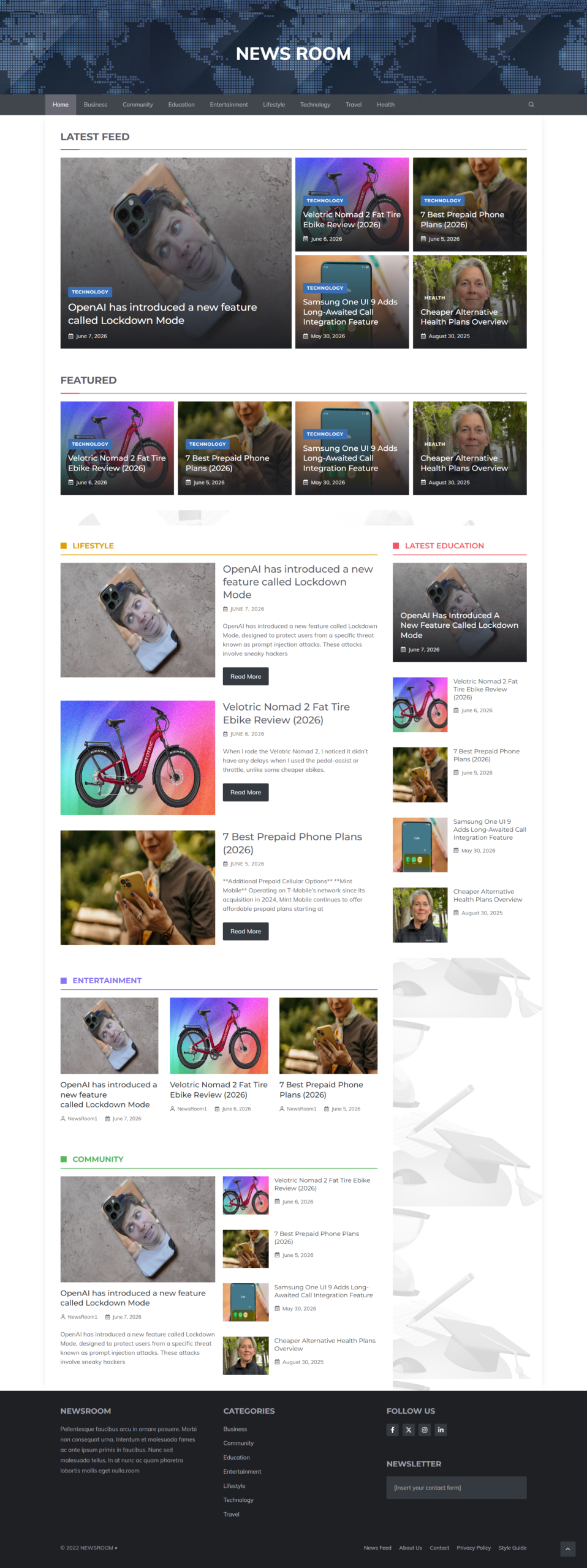
Newsroom: A lightweight WordPress template for news and magazine websites focused on speed, SEO, and performance.
Description
Newsroom
Newsroom: A lightweight, high-performance WordPress template for news, magazine, and editorial websites.
About the Vendor
Glorioustheme is known for developing WordPress themes and templates focused on usability, performance, and modern web design. Their products are typically built to help website owners create professional-looking websites without unnecessary complexity.
What Is Newsroom?
In a digital landscape where speed, user experience, and search engine visibility can make or break a website, choosing the right theme is more important than ever. That’s where Newsroom comes in.
Newsroom is a specialized WordPress template created specifically for magazine, editorial, and news-style websites. Rather than relying on heavy page builders and bloated design frameworks, Newsroom focuses on delivering a streamlined experience that prioritizes performance, responsiveness, and clean coding standards.
Many website owners struggle with themes that look impressive in demos but become slow and difficult to manage once real content is added. Newsroom takes a different approach. It is designed from the ground up to provide a fast-loading foundation for content-rich websites where readers expect quick access to articles, breaking news, reviews, and editorial content.
One of the key highlights of this template is its emphasis on lightweight performance. By eliminating unnecessary elements that often slow down websites, Newsroom helps publishers create professional news portals that load quickly across desktops, tablets, and mobile devices.
Whether you’re launching an online newspaper, technology blog, sports publication, entertainment magazine, or niche editorial platform, Newsroom provides a framework specifically tailored for content publishing.
The template also supports modern SEO practices through clean code architecture, making it easier for search engines to crawl and index content. This can be especially valuable for publishers seeking organic traffic growth.
Overall, Newsroom Review findings suggest that this template is designed for publishers who want a balance of professional design, speed, and simplicity. Instead of spending hours customizing complex page builders, users can focus on creating content while Newsroom handles the presentation layer efficiently.
For anyone searching for a dedicated editorial theme, Newsroom offers a practical solution aimed at performance-first publishing.
Features and Benefits
The biggest strength of Newsroom lies in its specialized feature set built specifically for content publishers.
1. Built for News and Magazine Websites
Unlike general-purpose themes, Newsroom is designed specifically for editorial content. This allows website owners to organize articles, categories, and featured content in a logical and reader-friendly way.
2. Lightweight Architecture
One of the standout benefits is its lightweight design. Many themes include unnecessary scripts and visual elements that can slow down websites. Newsroom focuses on keeping things efficient and fast.
3. Responsive Design
Modern audiences consume content from various devices. Newsroom adapts automatically to desktops, tablets, and smartphones, ensuring a consistent user experience.
4. SEO-Friendly Structure
Search engine optimization starts with a strong technical foundation. Newsroom utilizes clean coding practices that support better indexing and improved search visibility.
5. Fast Loading Performance
Speed influences both user engagement and search rankings. The optimized structure helps pages load quickly, improving visitor retention.
6. Professional Editorial Layout
The template is built to showcase articles effectively, making it suitable for online magazines, blogs, and news portals.
7. No Heavy Page Builder Dependency
Many WordPress themes require complex page builders that add unnecessary weight. Newsroom avoids this issue, allowing users to maintain performance without sacrificing functionality.
8. Clean Code Base
A clean code structure typically leads to easier maintenance, better compatibility, and long-term stability.
Benefits Summary
- Improved website speed
- Better SEO potential
- Professional news-style presentation
- Enhanced mobile experience
- Easier content management
- Reduced reliance on bloated plugins
- Strong foundation for content-focused websites
Overall, the features included in Newsroom are geared toward helping publishers create fast, efficient, and user-friendly websites.
How Does It Work?
Newsroom follows a straightforward approach designed to help publishers launch a professional website quickly.
First, users install the template on their WordPress website. Once activated, the theme provides a structure specifically optimized for editorial and news content.
Instead of building layouts from scratch, users can begin organizing content into categories such as:
- News
- Reviews
- Opinion pieces
- Features
- Industry updates
- Editorial articles
The template automatically handles the visual presentation of content. Featured stories can be highlighted, category pages can display related articles, and readers can navigate through content in an intuitive manner.
Since Newsroom is built with performance in mind, the underlying framework minimizes unnecessary code and resources. This helps reduce loading times while maintaining a professional appearance.
Responsive functionality ensures that visitors receive an optimized experience regardless of device type. Whether a reader visits from a smartphone during a commute or a desktop computer at work, the content remains accessible and visually appealing.
The SEO-friendly code structure helps search engines understand website content more effectively. This can contribute to improved discoverability and greater organic traffic potential.
A major advantage is the lack of dependency on heavy page builders. Users can focus on publishing articles instead of spending significant time designing individual pages.
The process can be summarized as:
- Install Newsroom.
- Configure site settings.
- Add categories and content.
- Publish articles.
- Let the optimized design present content professionally.
- Grow readership through improved performance and SEO.
This simplicity makes Newsroom appealing to both experienced publishers and beginners seeking an efficient content management solution.
Who Is It For?
Newsroom is ideal for:
News Publishers
Organizations or individuals running online news portals can benefit from the specialized layout and performance optimization.
Magazine Owners
Digital magazines covering technology, fashion, sports, entertainment, business, or lifestyle topics can present content professionally.
Bloggers
Content creators who publish articles regularly may appreciate the speed and clean design approach.
Niche Content Websites
Industry-specific publications and authority sites can use Newsroom to organize large volumes of content efficiently.
SEO-Focused Website Owners
Those seeking strong technical foundations for search engine optimization may find Newsroom particularly attractive.
Agencies and Freelancers
Web developers building editorial websites for clients can use Newsroom as a performance-focused solution.
It may be less suitable for users looking for highly visual drag-and-drop page-building experiences since its core focus is performance and content publishing.
Why Choose Newsroom?
There are many WordPress themes available today, but Newsroom distinguishes itself through specialization and performance.
The primary reason to choose Newsroom is its dedicated focus on editorial websites. Rather than trying to serve every possible website type, it concentrates on helping publishers succeed.
Additional reasons include:
- Fast loading speeds
- SEO-friendly structure
- Responsive design
- Clean code architecture
- Professional editorial layouts
- Reduced website bloat
- Easy content presentation
For website owners who understand the importance of speed and user experience, Newsroom provides a strong foundation without unnecessary complexity.
At a price of $49.99, it offers an affordable option for individuals and businesses seeking a professional publishing solution.
Overall, this Newsroom Review finds the template particularly attractive for content-heavy websites where performance and readability are top priorities.
Funnel Details
$49.99
FAQs
1. What is Newsroom?
Newsroom is a WordPress template designed specifically for news, magazine, and editorial websites.
2. Who created Newsroom?
The template is developed by Glorioustheme.
3. What makes Newsroom different from general-purpose themes?
It focuses on publishing performance, speed, responsiveness, and SEO rather than excessive design features.
4. Is Newsroom mobile-friendly?
Yes. It is built with responsive design principles to work across various devices.
5. Does Newsroom support SEO?
Yes. The template emphasizes clean code and SEO-friendly architecture.
6. Is Newsroom suitable for blogs?
Absolutely. Bloggers can use it to organize and publish content efficiently.
7. Does it require a page builder?
Based on the available information, Newsroom is designed to minimize reliance on heavy page builders.
8. How much does Newsroom cost?
The listed price is $49.99.
Conclusion and Call to Action
If you’re searching for a performance-focused WordPress template built specifically for editorial publishing, Newsroom deserves serious consideration.
Its combination of lightweight architecture, responsive design, clean code, and SEO-friendly structure makes it a practical choice for news websites, online magazines, and content publishers.
For just $49.99, Newsroom provides a streamlined solution that allows you to focus on creating content instead of managing unnecessary complexity.
Ready to launch a faster, more professional news website? Newsroom could be the foundation you’re looking for.
See More Of Our Themes, Templates and Plugins Here
Related products
-

My Yoga Divi Theme
Price range: $10.00 through $23.00 Select options This product has multiple variants. The options may be chosen on the product page -
Sale!

Modern Beer Responsive Template
Original price was: $10.00.$0.00Current price is: $0.00. Add to cart -
Sale!

Baby Strollers Instant Mobile Video Site
Original price was: $9.95.$3.99Current price is: $3.99. Add to cart -

Astra Pro Theme
Price range: $10.00 through $23.00 Select options This product has multiple variants. The options may be chosen on the product page